
Multi-Channel Employee Communication: Platform Comparison 2026
Organizations waste $95K–$143K annually managing 5–7 disconnected tools while employees miss 53% of internal messages. Unified multi-channel platforms deliver messages across digital signage, desktop screensavers, desktop scroller, desktop wallpaper, priority alerts, Microsoft Teams, WhatsApp, and SMS from one interface—94% employee reach, 60–75% cost reduction, 75% less admin time.
TL;DR
- The Problem
- Your organization is likely spending $95K–143K annually managing 5–7 disconnected communication tools while your employees miss 53% of internal messages.
- The Solution
- Multi-channel communication platforms deliver messages across digital signage, desktop screensavers, desktop scroller, desktop wallpaper, priority alerts, Microsoft Teams, WhatsApp, and SMS from one interface.
- The Impact
- 94% employee reach (vs 47% fragmented), 60–75% cost reduction, 75% less admin time.
- Who Needs This
- HR leaders, Internal Communications Directors, CPOs at organizations with 200+ employees, especially multi-site or distributed workforces.
Executive Summary
Your organization is likely managing 5–7 separate communication tools — email, Slack or Teams, a digital signage vendor, SMS service, intranet, and a mobile app — paying $94,820–$143,480 annually in licensing and administrative costs while employees miss 53% of organizational messages due to platform fragmentation (Based on Pickcel's research of 200+ enterprise deployments, 2026). Your employees switch between these tools 10+ times daily, losing focus to context switching while critical announcements slip through the gaps between siloed systems.
KEY INSIGHT
Organizations that activate three or more channels simultaneously achieve an average of 94% employee message reach within 2 hours — compared to 47% for single-channel email approaches. (Pickcel enterprise deployment research data, 2026.)
Multi-channel employee communication platforms solve this through unified architecture: one system delivering messages across digital signage, desktop screensavers, desktop scroller, desktop wallpaper, priority alerts, Microsoft Teams, WhatsApp, and SMS from a single interface. Organizations that consolidate from fragmented stacks to a unified platform report 94% employee message reach, 60–75% cost reduction, and 75% less administrative time. This guide gives you everything you need to evaluate platforms, calculate your total cost of ownership, select the right channel for each message type, and plan a structured migration.
Who Needs This
The Impact
94%
Employee Reach
vs 47% fragmented
60-75%
Cost Reduction
vs multi-tool stack
75%
Less Admin Time
vs manual workflows
Defining Multi-Channel Employee Communication
Multi-channel employee communication is the practice of delivering organizational messages through multiple distinct touchpoints simultaneously — desktop, mobile, ambient displays, collaboration tools — from a unified internal communication platform, ensuring comprehensive reach regardless of where your employees work, what devices they use, or whether they are desk-based or frontline. ensuring comprehensive reach regardless of where your employees work, what devices they use, or whether they are desk-based or frontline. Pickcel's employee communication app consolidates these touchpoints into one managed interface for both desk-based and frontline teams.
Key Distinction: Multi-Channel vs Omni-Channel
- Multi-channel: The same message is sent across multiple separate channels simultaneously (email + signage + SMS). Each channel operates independently. Goal: maximum reach through redundancy.
- Omni-channel: Channels are aware of each other — if an employee reads the email, the SMS is suppressed. Goal: seamless, coordinated experience.
Most organizations need multi-channel (redundancy = reliability) rather than omni-channel (coordination = complexity). For urgent safety alerts or compliance deadlines, redundancy is not inefficiency — it is the architecture of guaranteed reach.
💡 PRO TIP:
For urgent or critical messages, prioritize multi-channel (redundancy = reliability) over omni-channel (seamless = complexity). Employee safety > elegant UX.
8 Core Communication Channels Explained
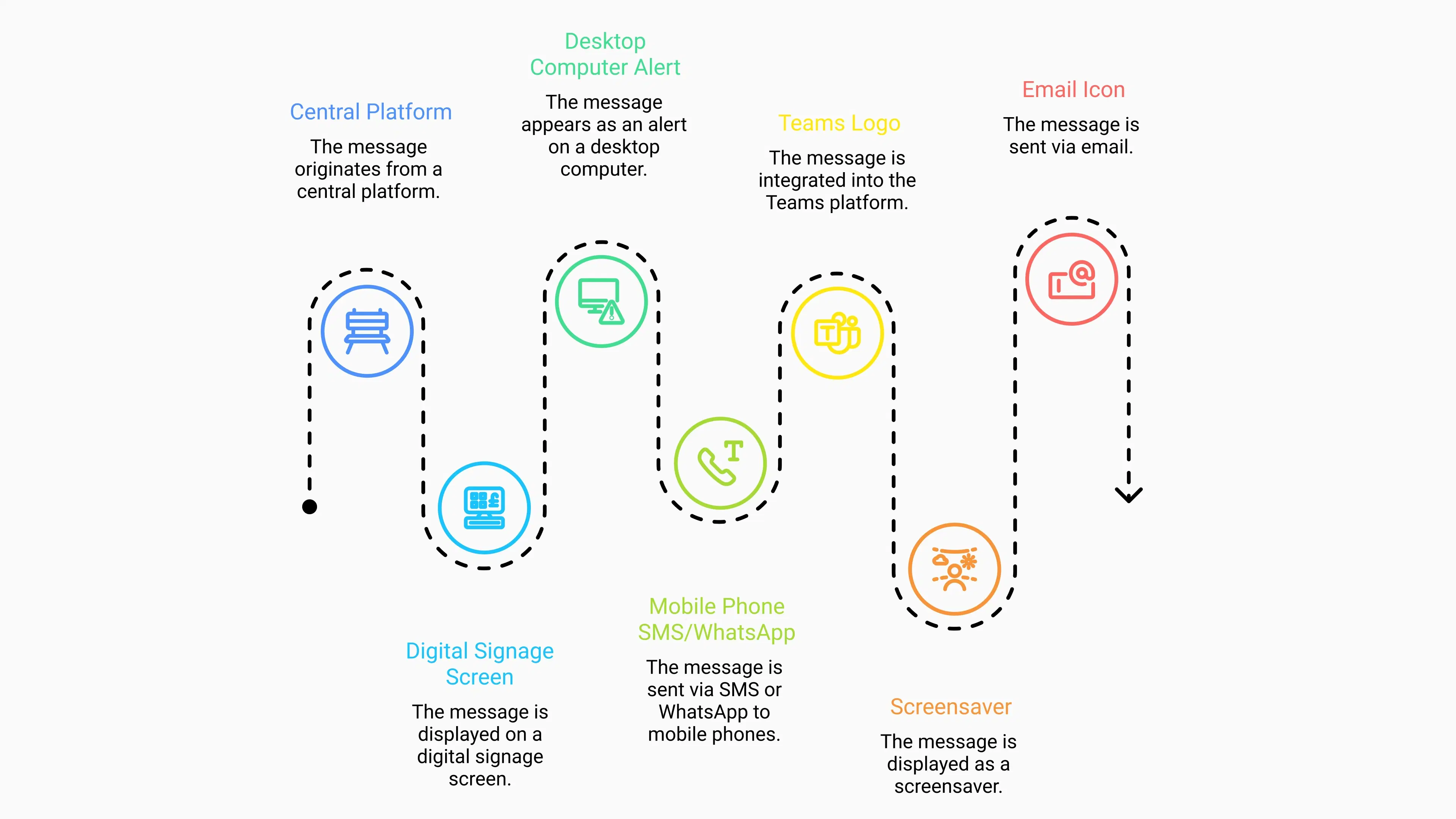
The 8 core channels in a unified platform are digital signage, desktop screensavers, desktop scroller, desktop wallpaper, priority alerts, Microsoft Teams or Slack, mobile (SMS/WhatsApp/push), and email — each reaching a distinct employee segment through a different touchpoint, and together delivering coverage no single channel can achieve alone.
Channel 1: Digital Signage
Reach: 62% of employees physically present in high-traffic areas.
Best For: Persistent ambient communication, visual storytelling, culture content, safety reminders.
Limitation: Requires physical presence — cannot guarantee individual exposure for remote or deskless workers.
Cost: $36–48 per screen annually (standalone), $0 incremental on a unified platform.
Learn more about office digital signage solutions for workplace communication.
Channel 2: Desktop Screensavers
Reach: 45% of desk workers with idle screens.
Best For: Non-urgent policy reminders, benefits enrollment deadlines, HR campaign reinforcement.
Limitation: Displays only during idle periods — not visible while employees are actively working.
Cost: Rarely sold standalone; $0 incremental on a unified platform.
Channel 3: Priority Desktop Alerts
Reach: 100% of logged-in employees — delivered as an interruptive on-screen notification that demands acknowledgement.
Best For: Emergency notifications, critical IT outages, urgent safety or policy changes that require immediate attention.
Limitation: Overuse causes alert fatigue rapidly. Reserve exclusively for true urgency — facility emergencies, critical IT outages, immediate safety threats. Limit to no more than 2–3 uses per employee per month.
Cost: $25–40/user/year standalone; $0 incremental on a unified platform.
⚠️ ALERT FATIGUE PREVENTION:
Limit desktop alerts to <3 per month per employee. Overuse destroys effectiveness. Reserve for: facility emergencies, critical IT outages, immediate safety threats.
For critical scenarios, explore emergency notification systems designed for frontline and deskless teams.
Channel 4: Email
Reach: 41% open rate for desk workers, 23% for frontline workers.
Best For: Detailed information, documentation, policy records, and asynchronous communication that does not require immediate action.
Limitation: Average workers receive 121 emails per day — organizational announcements compete with external noise and suffer chronic inbox blindness.
Cost: Included in Microsoft 365/Google Workspace licensing.
Channel 5: Microsoft Teams / Slack
Reach: 67% engagement rate when employees use the tool daily for work.
Best For: Team-specific updates, conversational announcements, chat-based culture moments.
Limitation: Notification fatigue — internal announcements compete directly with project messages. Employees are trained to filter channel noise.
Cost: Typically bundled with collaboration license.
Channel 6: Mobile (SMS / WhatsApp / App Push)
Reach: 98% read rate for SMS, 90% for app push (if the app is adopted). (GSMA Mobile Economy Report, 2025.)
Best For: Emergency alerts, shift schedule changes, and urgent updates for deskless or frontline workers who never see email or desktop notifications.
Limitation: Requires phone numbers for SMS or app installation for push — carrier costs apply for SMS at scale.
Cost: $25–45/user/year + $0.01–0.04 per SMS.
Channel 7: Desktop Scroller
Reach: 100% of active desktop users — visible while employees are working, not just when idle.
Best For: Urgent and important communication that needs guaranteed visibility — breaking announcements, compliance deadlines, safety alerts, and time-sensitive reminders delivered as a persistent scrolling ticker at the edge of the screen without interrupting workflow.
Limitation: Desk workers only. Not applicable for frontline or deskless employees without desktop access.
Cost: $0 incremental — included in the unified platform.
Unlike desktop alerts (which employees can dismiss) or screensavers (which only appear at idle), the Desktop Scroller runs continuously while employees work. It is one of the highest-guarantee channels for important messages that must not be missed — and it achieves this without interrupting the employee or demanding any action.
Channel 8: Desktop Wallpaper
Reach: 100% of desk workers — visible every time an employee minimises windows or glances at their desktop throughout the day.
Best For: High-priority ongoing communication — emergency protocols, active policy changes, campaign awareness, compliance notices — that needs passive but persistent visibility across the entire workday.
Limitation: Not suitable as a standalone channel for messages requiring immediate action. Best combined with an alert or scroller for time-critical content.
Cost: $0 incremental — included in the unified platform.
The Desktop Wallpaper channel turns every desktop background into a live communication surface. Unlike screensavers, wallpaper is visible the instant a window is minimised — ensuring that important messages maintain constant peripheral presence without requiring any employee action. Pair it with the Desktop Scroller for layered passive reach: the wallpaper anchors the message visually while the scroller keeps it in motion. Together, they achieve 100% passive desk-worker reach with zero dependence on email open rates or notification opt-ins.
Single-Channel vs Multi-Channel Platform Comparison
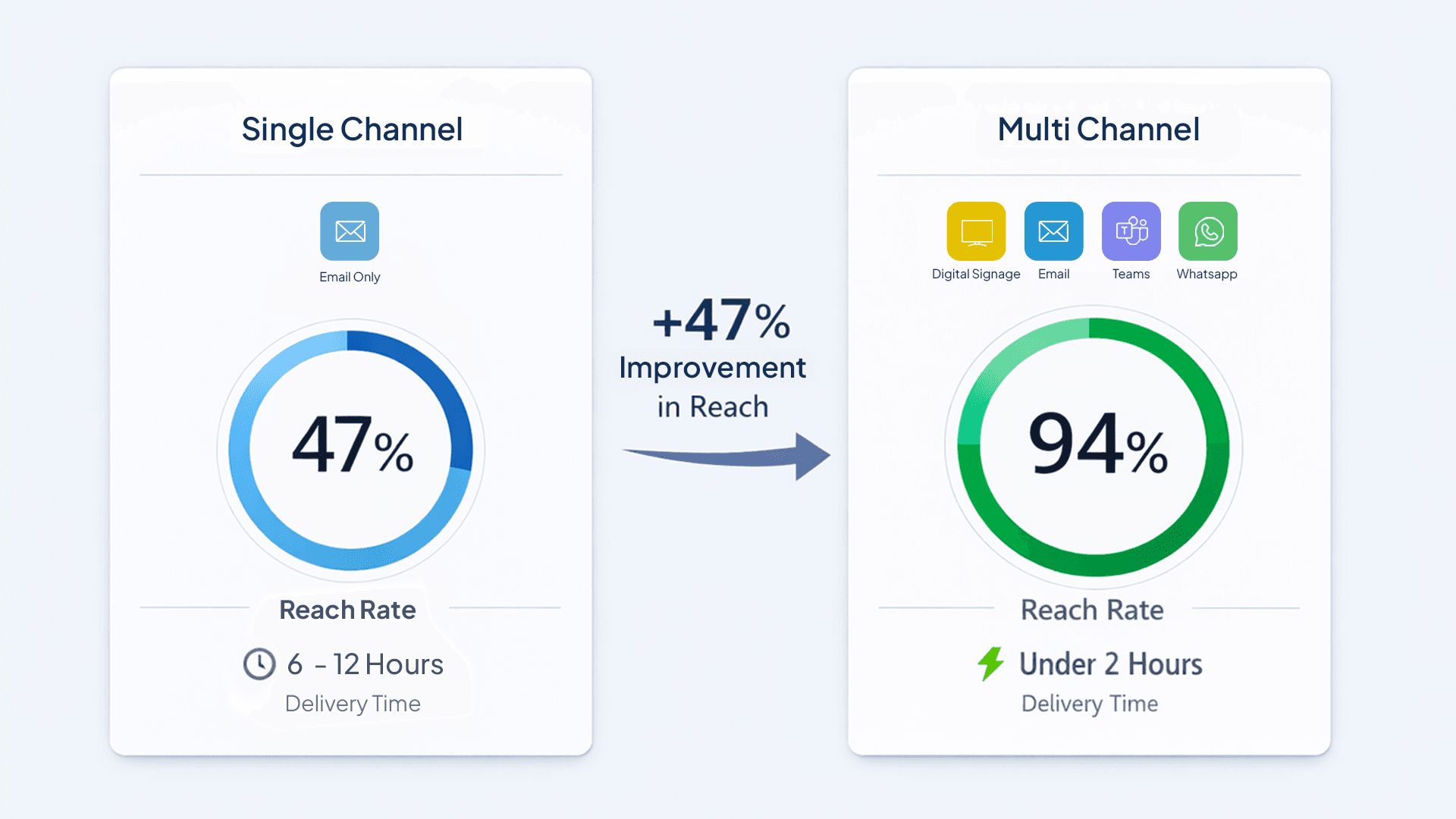
Multi-channel platforms achieve 94% employee reach in under 2 hours; single-channel email reaches just 47% of employees over 6–12 hours — a gap that, in an emergency or compliance scenario, is the difference between a managed situation and an uncontrolled one.
Compare Message Reach by Approach
| Approach | Example | Employee Reach | Time to 90% Reach |
|---|---|---|---|
| Single-Channel | Email only | 47% | 6-12 hours |
| Dual-Channel | Email + Teams | 68% | 2-4 hours |
| Multi-Channel | Desktop alerts + Scroller + Signage + Mobile + Teams | 94% | <2 hours |
Measure Employee Sentiment
Single-Channel (Email-Heavy) Organizations:
- "I always miss important announcements": 67% agree
- "I know what's happening in the organization": 38% agree
- Communication satisfaction: 2.3/5.0
Multi-Channel Organizations:
- "I always miss important announcements": 19% agree
- "I know what's happening in the organization": 81% agree
- Communication satisfaction: 4.1/5.0
Channel Selection Matrix by Message Type and Urgency
Not every message needs every channel. The core selection principle is: the higher the urgency, the more channels you activate — prioritising channels that guarantee reach over those that depend on employee opt-in. Your Desktop Scroller and Wallpaper are always-on passive channels; reserve Desktop Alerts for true emergencies only.
| Message Type | Urgency | Recommended Channels | Why |
|---|---|---|---|
| Emergency Evacuations | Critical | Desktop Alerts + Scroller + Wallpaper + Signage + SMS | Layered redundancy — 100% desk worker visibility guaranteed |
| IT System Outages | High | Desktop Alerts + Scroller + Teams + Email | Immediate awareness; scroller keeps message visible while employees work |
| Compliance Deadlines | High | Scroller + Wallpaper + Email | Combined passive reach ensures no desk worker misses a deadline |
| CEO Updates | Medium | Signage + Screensaver + Wallpaper + Email + Teams | Multiple exposures across passive and active surfaces |
| Policy Changes | Medium | Wallpaper + Screensaver + Signage + Email | Persistent visibility over days — wallpaper ensures message stays in view |
| Benefits Enrollment | Medium | Scroller + Signage + Screensaver + Email | Running scroller reminder removes reliance on email open rates |
| Event Announcements | Low | Scroller + Signage + Email + Teams | Scroller keeps events top-of-mind without flooding inboxes |
| Employee Recognition | Low | Signage + Teams | Positive culture visibility in shared and digital spaces |
| Safety Reminders | Ongoing | Wallpaper + Scroller + Signage (daily rotation) | Zero-effort persistent visibility — no employee action required |
Platform Architecture: Unified vs Integrated vs Fragmented
The three architecture models differ fundamentally in annual cost and administrative burden: fragmented stacks cost $70–105K per year and demand 170–250 hours of admin time; integrated stacks cost $45–75K; unified platforms cost just $18–35K with as little as 30–50 hours of overhead annually.
Evaluate Fragmented Architecture (5–7 Separate Tools)
Structure:
- Each channel managed by a separate vendor
- No communication between systems
- Content created individually for each channel
- Siloed analytics with no unified view
Pros:
- Best-of-breed tool selection per channel
- Flexibility to swap individual vendors
Cons:
- Highest cost ($70–105K annually for 500 employees)
- Maximum administrative overhead (170–250 hours annually)
- Inconsistent messaging across channels
- No unified analytics
- Complex vendor management across 5–7 contracts
Who Should Use This: Large enterprises with dedicated IC teams who own each channel independently and have the budget and headcount to absorb the overhead.
Evaluate Integrated Architecture (3–4 Tools with APIs)
Structure:
- One primary platform (email or intranet) with 2–3 specialized tools connected via API
- Content created in the primary platform and pushed to others
- Aggregated analytics through middleware
Pros:
- Moderate cost ($45–75K annually)
- Reduced admin overhead (100–150 hours annually)
- Mostly consistent messaging
Cons:
- Integration fragility — APIs break, often silently
- Ongoing integration maintenance
- Some manual work remains
- Analytics require custom dashboards that must be rebuilt when APIs change
Who Should Use This: Mid-size organizations (500–2,000 employees) with dedicated IT resources for integration maintenance and a preference for retaining specific tools.
Evaluate Unified Architecture (Single Multi-Channel Platform)
Structure:
- One platform manages all channels natively
- Content is created once and distributed to selected channels simultaneously
- No integrations to maintain
- Unified analytics dashboard
Pros:
- Lowest total cost ($18–35K annually for 500 employees)
- Minimal admin overhead (30–50 hours annually)
- Guaranteed message consistency
- Single-pane-of-glass reporting
- One vendor to manage
Cons:
- Less flexibility for best-of-breed selection per channel
- The platform must support all channels your organization needs — vet channel coverage carefully before committing
Who Should Use This: Most organizations seeking cost efficiency and operational simplicity — especially multi-site, distributed, or high-growth teams.
Explore unified internal communication platforms for distributed teams.
Vendor Landscape: Pickcel vs ScreenCloud vs Poppulo
Pickcel is the only vendor in this comparison delivering all 8 communication channels — including the uniquely desktop-native Scroller and Wallpaper — from a single unified platform. Competitors offer between 1 and 4 channels and require additional tools for complete coverage.
Platform Comparison
| Vendor | Channels | Architecture | Price (per employee/year) | Best For |
|---|---|---|---|---|
| Pickcel | 8 channels (signage, screensaver, desktop scroller, desktop wallpaper, alerts, Teams, WhatsApp, SMS) | Unified | $18–24 | SMB to mid-market, multi-site, cost-conscious |
| ScreenCloud | 1 channel (signage only) | Single-channel | $36–48 per screen/year | Office environments, signage-only needs |
| Poppulo | 4 channels (email, mobile app, signage, Teams) | Integrated | $60–80 | Enterprise-only, Fortune 500, large budgets |
| Staffbase | 3 channels (mobile app, intranet, email) | Integrated | $45-65 | Mobile-first, deskless workers |
Feature Comparison
| Feature | Pickcel | ScreenCloud | Poppulo | Staffbase |
|---|---|---|---|---|
| Desktop Alerts | ✓ | ✗ | ✗ | ✗ |
| Screensavers | ✓ | ✗ | ✗ | ✗ |
| Desktop Scroller | ✓ | ✗ | ✗ | ✗ |
| Desktop Wallpaper | ✓ | ✗ | ✗ | ✗ |
| Digital Signage | ✓ | ✓ | ✓ | ✗ |
| Mobile SMS | ✓ | ✗ | ✓ | ✓ |
| Teams Integration | ✓ | ✗ | ✓ | ✗ |
| ✓ | ✗ | ✗ | ✗ | |
| Create Once, Publish Everywhere | ✓ | N/A | ✗ (partial) | ✗ (partial) |
| Unified Analytics | ✓ | N/A | ✓ | ✓ |
| On-Premise Option | ✓ | ✗ | ✓ | ✗ |
For enterprise-scale corporate communication, consider corporate digital signage software designed for large organizational deployments.
Looking for apps to extend your signage content? See the best corporate signage apps for office environments.
Total Cost of Ownership: Platform Comparison
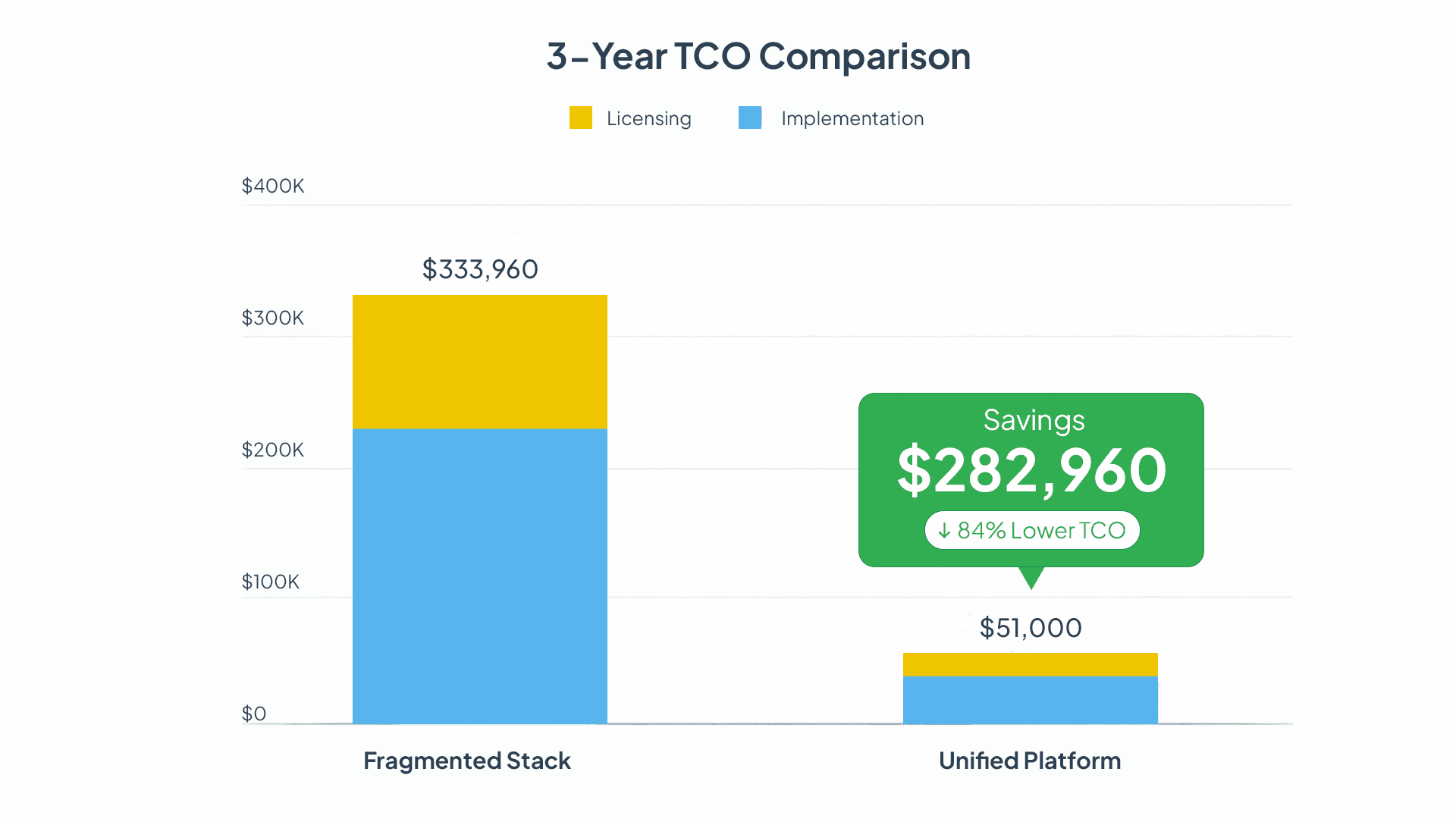
A unified multi-channel platform costs 85% less than a fragmented tool stack over 3 years: $51,000 vs $333,960 for a 500-person organisation — a saving of $282,960 that most IC teams could reinvest in content strategy, training, or additional headcount.
3-Year TCO Analysis (500 Employees)
| Approach | Year 1 | Year 2-3 | 3-Year Total |
|---|---|---|---|
| Fragmented Multi-Tool Stack | $94,820 (licensing) + $49,500 (implementation) = $144,320 | $94,820 annually | $333,960 |
| Unified Multi-Channel Platform (Pickcel) | $12,000 (licensing) + $15,000 (implementation) = $27,000 | $12,000 annually | $51,000 |
Savings: $282,960 over 3 years (85% reduction).
💰 ROI SNAPSHOT:
85% cost reduction = $282,960 saved over 3 years. Payback period: 4–6 months. That is the equivalent of 2–3 full-time employee salaries reinvested in strategic HR and communications initiatives.
Migration Strategy: Consolidating from Multiple Tools
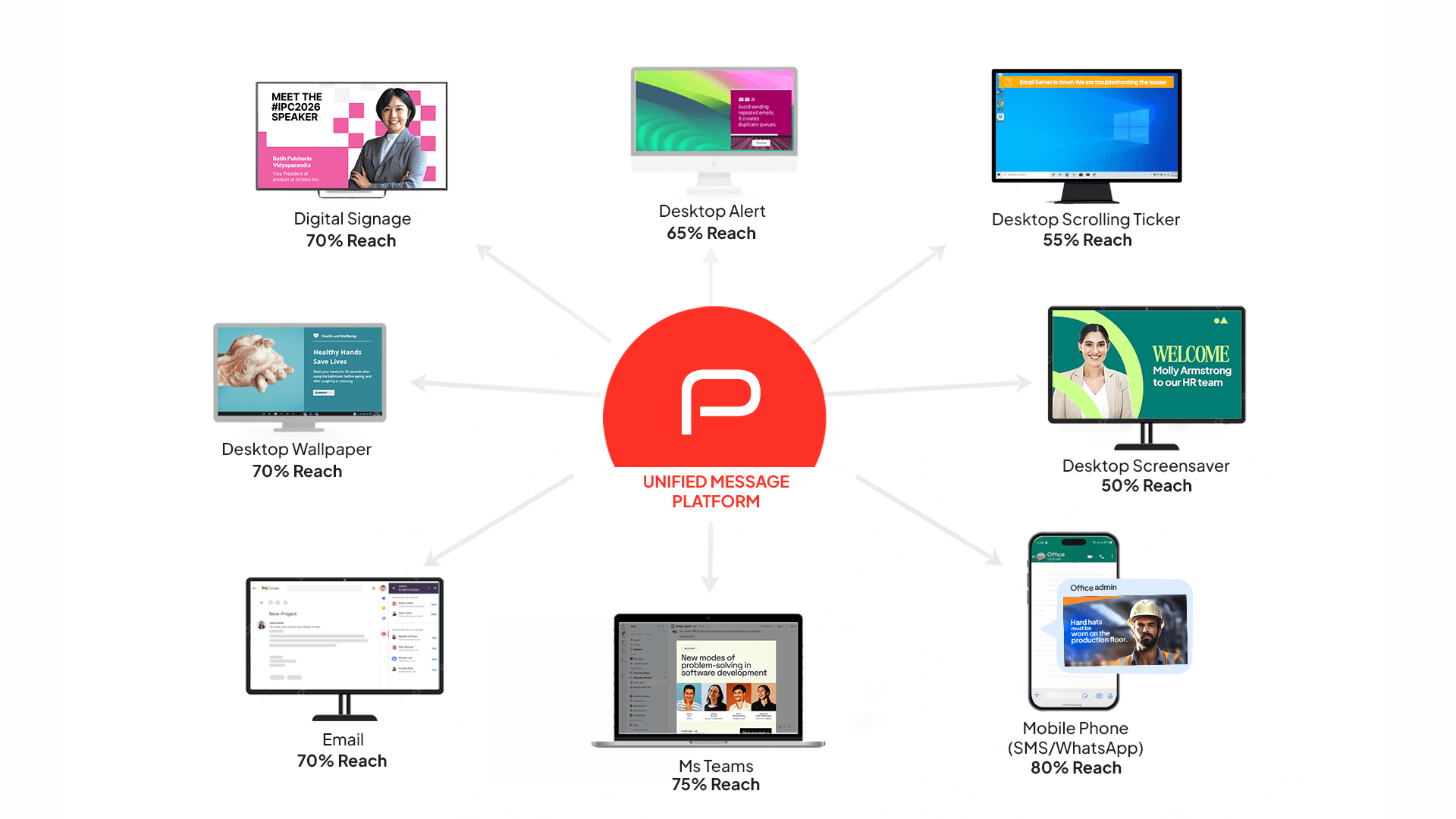
A complete migration from fragmented tools to a unified platform typically takes 17–20 weeks across 5 structured phases — from assessment and vendor selection through pilot, full rollout, and legacy decommissioning. The process is sequential and each phase gates the next.
Phase 1: Assess Your Current Stack (Weeks 1–2)
- Inventory every current communication tool, its cost, and its contract end date.
- Map which tools deliver which message types and to which employee segments.
- Identify tool overlap, coverage gaps, and the channels your workforce actually uses.
- Survey employees on tool usage, frustrations, and preferred communication methods.
Phase 2: Select Your Unified Platform (Weeks 3–6)
- Define your must-have channel requirements across all employee types (desk, deskless, frontline).
- Evaluate unified platform vendors against your channel, analytics, and integration requirements.
- Calculate TCO for your current fragmented stack versus the unified alternative.
- Select a platform and negotiate contract terms, including implementation support and SLA commitments.
Phase 3: Run a Pilot Deployment (Weeks 7–10)
- Deploy to one department or location that represents a cross-section of your workforce.
- Migrate existing content from legacy tools into the new platform.
- Train pilot users — administrators, content managers, and department leads.
- Collect structured feedback and refine workflows before scaling.
Phase 4: Execute the Full Rollout (Weeks 11–16)
- Deploy to your entire organization in coordinated waves.
- Run the new platform in parallel with legacy systems for 2–4 weeks — do not decommission yet.
- Migrate all content, templates, and automated workflows.
- Train all administrators, content managers, and departmental communication leads.
Phase 5: Decommission Legacy Tools (Weeks 17–20)
- Cancel legacy subscriptions with proper notice periods — check contractual terms before proceeding.
- Export and archive all historical data and content from legacy systems before access is lost.
- Archive old content in a format your team can access post-migration.
- Redirect all employees to the new platform and confirm adoption through analytics.
⚠️ COMMON MISTAKE:
Do not cancel legacy tools on the day of go-live. Running both systems in parallel for 2–4 weeks is not inefficiency — it is the standard safety net that catches edge cases, missed workflows, and low-adoption teams before they become post-migration incidents.
Conclusion
Your organization is paying $94,820–$143,480 annually to run a fragmented 7-tool communication stack — and your employees are still missing 53% of internal messages. The problem is not effort; it is architecture. Siloed tools create siloed reach. A message sent through email alone reaches 47% of your workforce over 6–12 hours. The same message sent through a unified multi-channel platform reaches 94% of your workforce in under 2 hours.
Unified platforms — like Pickcel's 8-channel system spanning digital signage, screensavers, desktop scroller, desktop wallpaper, priority alerts, Teams, WhatsApp, and SMS — solve this by delivering every message from one interface. The business case is straightforward: organizations that consolidate from a fragmented stack to a unified platform report 94% message reach, 60–75% cost reduction, and 75% less administrative overhead. Over 3 years, that translates to $282,960 in direct cost savings for a 500-person organization — enough to fund 2–3 full-time roles. The platforms exist. The data is clear. The only remaining question is how long your team continues to pay the fragmentation penalty.
Organizations investing in unified communication platforms consistently report improved employee experience through reduced tool fatigue, higher message reach, and communications teams that spend their time on strategy — not platform administration.
Frequently Asked Questions
Still have questions?
Our team is here to help with anything not covered above.

Turn 7 communication tools into one unified platform
Deliver every message across desktop, mobile, signage, and collaboration channels from a single interface — with 94% reach, unified analytics, and 75% less admin effort.