
Dec 29 2025

14 min read
November 05, 2025
8 min read


ALL
MANUFACTURING
ON-PREMISE
I came across this LinkedIn post a few weeks ago, and it stuck with me, not because it was new, but because it was real.

“This lack of visibility isn’t a small problem; it’s a growth killer.”
This visibility gap, where live data remains locked inside PLC and SCADA systems, keeps factories reactive rather than proactive. When teams can’t see what’s happening in real-time, minor process deviations can turn into costly downtime, missed quotas, and even safety incidents.
Across industries, unplanned downtime can drain anywhere from $50,000 to over $2 million per hour, yet most plants still rely on manual updates or outdated HMIs that few operators can access.
What if your factory floor could see what your SCADA system already knows?
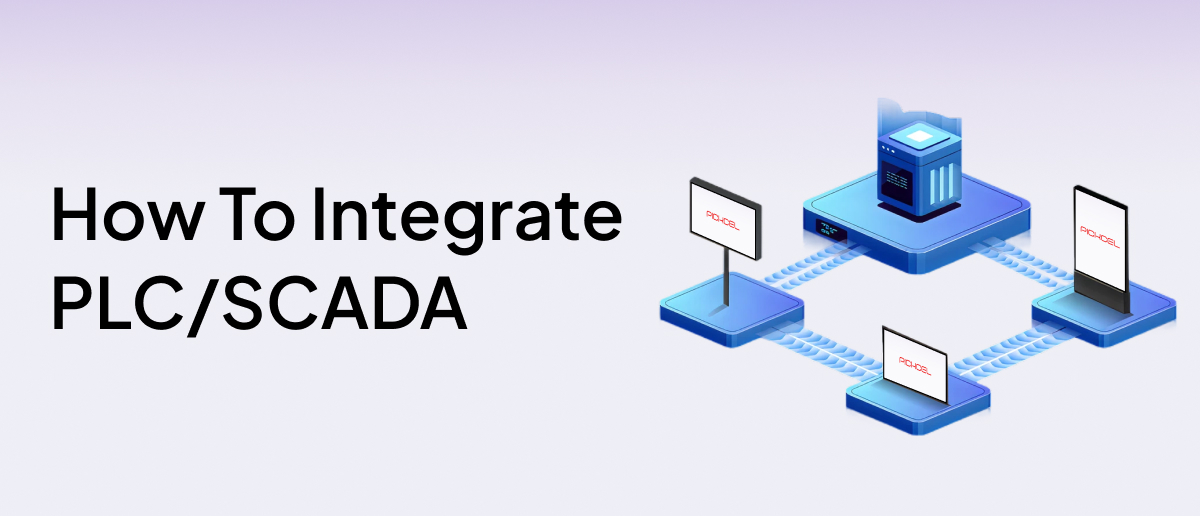
By securely connecting your existing PLC or SCADA setup to on-premise digital signage software, you can display live metrics, alarms, and performance dashboards directly on factory screens. Securely, without touching your control logic or exposing your network to the internet.
Factory and plant managers, operations heads, and automation engineers who want to turn their PLC or SCADA insights into real-time factory screen displays, improving visibility, response time, and safety within secure on-premise networks.
Start with what operators need to see, not everything your system collects. Pick 3–4 metrics that drive quick action, OEE, line speed, downtime reason, temperature, or fault alerts. Work with your automation team to list the exact SCADA tags for those metrics. For each tag, define:
Tag name (standardized)
Source address (PLC or SCADA)
Normal range & alert limit
Update frequency (e.g., every 5s)
Now is where your live SCADA or PLC data is safely converted into dashboard-ready information for your factory screens.
Install a data gateway or IIoT middleware inside your network. This will sit between your PLC/SCADA systems and your on-premise signage CMS.
It should:
Read from PLCs or SCADA via OPC UA, Modbus TCP, or similar protocols.
Convert data to a standard web format like JSON or REST API.
Maintain read-only access; signage systems must never send commands back.
Choose a communication protocol based on your network setup:
| Protocol | Ideal Use Case | Security & Benefit |
|---|---|---|
| OPC UA | Continuous high-frequency data. | Encrypted TLS link, client–server model, automatic reconnect. |
| MQTT | Large plants or multi-site data streaming. | "Reverse connectivity" devices push outbound data; no inbound ports open. |
| REST API | Simple, on-demand dashboards. | HTTPS-secured, one-way polling from local endpoints. |
For security, never let your signage system talk directly to the SCADA network. Instead, set up a demilitarized zone (DMZ):

Place the Gateway in the DMZ as the only bridge between OT and IT.
Configure industrial firewalls so traffic flows one-way—from OT → DMZ → IT.
Allow only authorized HTTP or MQTT traffic to pass; block everything else.
If using Ignition Edge, run it as a proxy node in the DMZ to handle outbound traffic securely. All communication between the SCADA network and the signage CMS follows strict digital signage security standards, using encrypted HTTPS and TLS connections, firewall isolation, and a read-only data flow that keeps the control environment completely protected.
Once connected, ensure the system is both encrypted and reliable:
Use HTTPS for REST APIs and TLS for MQTT/OPC UA.
Configure the gateway to flag stale data after inactivity to avoid false readings.
Test latency between PLC updates and on-screen display (should be < 2 seconds for most KPIs).
For critical lines, deploy dual gateways or mirrored brokers for redundancy.
Once your PLC or SCADA data connects to your digital signage software solution, every screen on the shop floor becomes a live control point for visibility. The goal is to surface the right information at the right place, where it drives decisions and action.
Real-time production metrics: Display live OEE, throughput, and fault codes from SCADA so operators see performance drops the moment they occur. Track output versus target in real time to eliminate post-shift reporting delays.
Machine health and predictive maintenance: Display live temperature, vibration, or pressure trends to detect wear before failure. Trigger automatic alerts when readings exceed thresholds, and show maintenance queues or technician status in real time to prevent unplanned stops.
Safety and compliance visibility: Integrate live EHS and SCADA sensor data to deliver instant, site-wide alerts. When gas leaks, pressure drops, or overheating occurs, nearby screens flash red warnings with immediate actions. Display safety drills, PPE reminders, and compliance dashboards to keep safety visible without relying on emails or announcements.
Shift and workflow visibility: Show active orders, open maintenance tickets, and queue status for smooth shift handovers. Visualize Andon calls and material levels in real time so production, logistics, and maintenance teams work from the same live data.
Recognition and operational communication: Rotate production milestones, training reminders, and employee shout-outs alongside live dashboards. Build transparency and turn performance data into a shared, motivating scoreboard.
Walk through any factory that’s integrated its SCADA or PLC data with digital signage, and you can feel the difference before you even check a dashboard.
No one’s waiting for reports. Lines self-correct in minutes. Supervisors don’t chase updates; they see them. Every screen shows the pulse of production, safety, and performance in real time.
| Key Area | Before Integration | After Integration with On-Premise Signage |
|---|---|---|
| Visibility | Data locked in control rooms. | Live production data is visible on every screen. |
| Response Time | Delayed updates and missed alerts. | Instant visual alerts and faster operator action. |
| Maintenance | Reactive fixes after breakdown. | Predictive maintenance through live machine health. |
| Safety | Manual calls and static warnings. | Automated EHS alerts are shown in seconds. |
| Downtime Tracking | Paper logs and shift-end reports. | Continuous monitoring with root-cause visibility. |
| Engagement | Disconnected teams and silos. | Unified workforce aligned to shared live goals. |
| Security | Risky cloud integrations. | Fully local, encrypted, air-gapped system. |
Pickcel’s on-premise solution is built for manufacturers who demand full control without complexity. It runs entirely on your internal network, keeping your SCADA and PLC data secure, local, and under your control.
What sets Pickcel apart:
Air-gapped, SOC 2 & ISO 27001 certified deployment for sensitive OT environments.
Real-time dashboard integration with OPC UA, MQTT, REST API, and custom MES connectors.
Role-based access and encryption across all devices to protect industrial data.
Central control for multi-site networks, updating thousands of screens instantly.
Offline-first playback engine that keeps screens running even during network failures.
Custom screen apps & APIs to display SCADA data, KPIs, or maintenance queues live.
Our engineering team, with over a decade of industrial automation experience, will set up your on-premise deployment end-to-end, from secure server configuration to real-time dashboard integration.

You can display live OEE, downtime, and throughput from SCADA, along with temperature, vibration, and pressure readings. Add safety alerts, shift status, and production goals, everything operators need to act fast without opening reports or entering control rooms.
Teams spot faults instantly, react faster, and prevent downtime. Real-time dashboards align shifts, improve accountability, and keep every line working from the same live data.
Yes, integrated screens instantly show alerts for overheating, leaks, or pressure drops and display live PPE and compliance reminders. When a hazard is detected, messages override all other content so operators see exactly what’s wrong and how to respond.
The signage CMS connects to PLC or SCADA data through secure protocols like OPC UA, MQTT, or REST API. As data changes, dashboards refresh automatically on all screens within seconds, no manual updates or uploads required.

Dec 29 2025
14 min read
Nov 20 2025
9 min read
Nov 11 2025
12 min read
Nov 3 2025
7 min read
Take complete control of what you show on your digital signage & how you show it.
Start Free Trial Schedule My Demo