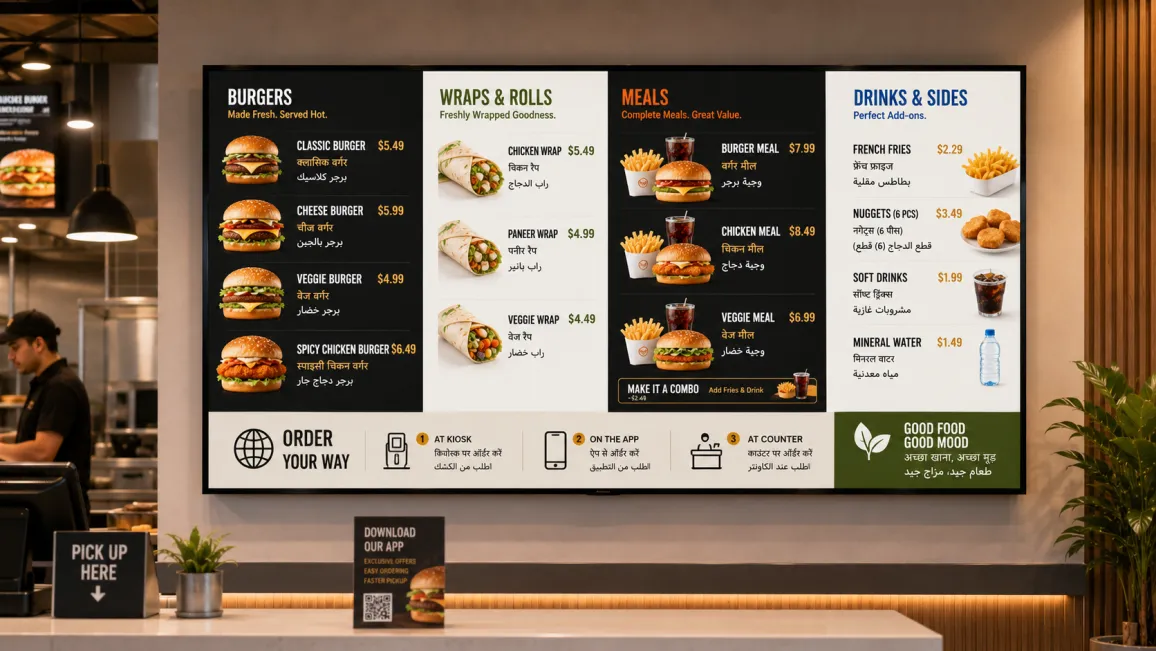
- Rotation interval per screen is configurable from seconds to minutes.
- Group-level updates push a change to every estate location at once.
- Arabic and Hebrew layouts adjust automatically with built-in RTL support.
What is a multilingual digital menu board?
A multilingual digital menu board is a display system that presents restaurant menu content in two or more languages, either by rotating through languages on a single screen or by assigning different languages to different screens within the same location. Unlike printed menus, which require a physically separate version for each language, a multilingual digital board lets operators update all language variants simultaneously from one CMS. One price change, one item addition, or one promotion goes live across every language on every screen at once.
This capability is built into digital menu board software rather than bolted on afterwards. If you are new to the format itself, start with the complete guide to digital menu boards and come back for the multilingual layer.
The multilingual menu challenge
Maintaining a multilingual menu across separate printed boards multiplies the maintenance burden: every update must be applied once per language, once per location, and across every format in use.
A restaurant at a Dubai airport terminal lists its items on three printed boards: one in English, one in Arabic, one in Mandarin. When the chef adds a dish, staff update three boards. When a price changes, three reprints. When the Riyadh branch has a different menu, the process starts again with different staff and different boards.
This is the operational reality for food service operators in multilingual markets. The translation work is only part of the burden. The harder part is synchronising updates across every language version at every location, without maintaining separate screen infrastructure for each language.
A digital menu board does not eliminate the translation step. What it removes is the maintenance multiplication. Create the source content once, assign language variants to a template, and publish to any combination of screens from a single dashboard. A change that previously touched six boards now touches one entry in the CMS.
Who needs a multilingual digital menu board?
Multilingual menu boards are relevant anywhere the customer base speaks more than one language and order accuracy matters.
Airport and travel food service is the most immediate context. International terminals handle passengers from dozens of countries within a single boarding cycle. A QSR operating in a major international terminal cannot assume every customer reads English. Displaying the local language and English is a baseline; in the Middle East and parts of Southeast Asia, Chinese and regional-language variants are increasingly standard at high-traffic food courts.
International franchise chains face this requirement across their full estate. A franchise operating in the GCC, Singapore, Canada, or the UK may have regulatory obligations in some markets: food labelling laws in several countries specify that menu information must appear in the national language. A single content standard that supports per-market language variants is far more manageable than country-by-country screen builds. This is where dedicated restaurant digital signage platforms earn their keep.
Tourist-district restaurants in cities such as Barcelona, Singapore, or Marrakech draw customers from many countries at the same time. Rotating languages on a single screen serves the whole room without requiring dedicated hardware per language group.
Multicultural urban markets across Canada, the UK, and Australia include large communities whose first language is not English. Restaurants serving South Asian, Chinese, or Arabic-speaking neighbourhoods often find that menu displays in the customer’s preferred language improve order confidence and reduce errors at the counter.
How multilingual content works in Pickcel
Pickcel’s cloud-based digital signage software handles multilingual menu boards through two approaches, which operators can combine depending on the physical layout of their location.
Language rotation displays the menu in Language A for a set interval, then transitions to Language B, then to Language C if required, before cycling back. The rotation interval is configurable per screen. A high-footfall counter might cycle every 20 seconds. A seated-area board, where customers have more time to read, might run each language for 45 seconds or longer. Every language version uses the same visual template with translated text substituted in, so the brand presentation is identical across all active languages. Customers see the same layout, the same prices, the same item photography regardless of which language is currently displayed. The rotation runs on the same scheduling engine used for dayparting and scheduling digital menu boards , so language cycles and meal period switches work together rather than fighting each other.
Location-based language assignment works differently. Instead of rotating languages on one screen, the operator assigns a specific language to each screen or screen group. A restaurant with two counters (one primarily serving Arabic-speaking customers, one serving English-speaking customers) assigns the relevant language to each screen group. Both screens draw from the same menu database. Only the language layer differs. This is the preferred approach where the physical layout naturally separates customer groups, or where language rotation would slow down order decisions for customers who can only read one language.
Setting this up in Pickcel involves three steps:
- Create a menu template and populate the base content in the primary language, starting from Pickcel’s customisable digital menu board templates .
- Create language variants within the same template, entering the translated text for each.
- Assign each variant to a screen schedule or a specific screen group.
When a menu item changes, the operator updates the source entry. Variants that can inherit the change (a sold-out flag, a price formatted identically across languages) update automatically. Variants that require new translated text (a new dish name or description) are flagged for review before the change goes live.
For operators managing multiple locations, language assignments scale through location groups. A group-level update applies across the estate. A branch-specific change affects only the screens at that site.
Design considerations for multilingual menus
Language support on digital menu boards is not only a translation task. Layout, typography, and text directionality change with the language, and those changes affect how the menu reads.
Right-to-left text direction is the most significant design consideration for operators serving Arabic or Hebrew-speaking customers. Both languages read right to left, which affects not just the text alignment but the visual hierarchy of the entire menu. Pricing, navigation, and item descriptions sit on opposite sides compared to a left-to-right layout. Pickcel’s template system applies directional styling when an RTL language variant is active. The menu layout mirrors automatically, so the Arabic version reads correctly without requiring the operator to build and maintain a separate RTL template.
Font coverage matters at the character level. A font family that renders Latin characters cleanly may not include Arabic, Devanagari, Chinese, or Thai glyph sets. A font that cannot render Arabic displays boxes in place of characters, which creates more confusion than displaying no translation at all. Before deploying multilingual templates, verify that the selected font family covers every language variant in use, or assign language-specific font overrides within the template.
Visual consistency across languages keeps the brand recognisable regardless of which language is active. When all language variants derive from the same base template, structural changes (updated background colours, new section layouts, revised image zones) apply across all variants simultaneously. Operators who previously maintained separate boards for each language often note that the template-based approach significantly reduces visual drift between language versions over time.
Text expansion is worth accounting for in initial template design. German and French text often runs 20 to 30 percent longer than English for equivalent content (a standard localization guideline). Arabic requires additional vertical clearance for diacritical marks above characters. Building templates with slightly more generous text containers prevents truncation or overflow when longer-than-expected language variants are loaded. In regulated markets these layout decisions sit alongside labelling obligations, covered in our guide to allergen-compliant digital menu boards .
Multilingual digital menu board use cases
Airport QSR (international terminals). A global QSR chain operating across international hubs configures English and Arabic on Middle Eastern routes, English and Mandarin on East Asian routes, and English and French on certain European connections. All locations draw from a single CMS instance with location-specific language assignments per terminal. A global price update reaches all terminals simultaneously, with each terminal displaying the correct price in the correct language.
Hotel restaurant (international guests). A hotel dining outlet serving a mixed international guest mix displays its full menu in English with a rotating secondary language corresponding to the week’s predominant guest nationality. The operations team adjusts the rotation schedule from the property management system without visiting the screens.
Franchise in GCC/MENA. A franchise operating across Saudi Arabia, the UAE, and Egypt faces both a regulatory requirement and a customer experience expectation. Arabic language display is required by food-service signage regulations in several of these markets. English serves business travellers and the large expatriate populations in the region. Managing both languages from a central content team through Pickcel means translation review happens once at the centre, not once per location. Pickcel’s SOC 2 Type II and ISO 27001 certifications satisfy the enterprise security requirements typical of large-scale franchise operations in these markets.
Multicultural urban locations. A restaurant in a Toronto neighbourhood with a significant Portuguese-speaking community adds a Portuguese language variant to its existing English boards without additional hardware. The same screens display English during morning peak hours and alternate with Portuguese variants targeted at the dinner-time regulars who form the majority of evening revenue.
Frequently Asked Questions
What is a multilingual digital menu board?
How does Pickcel display menus in multiple languages on the same screen?
Does Pickcel support right-to-left (RTL) languages like Arabic on digital menu boards?
Can I assign different languages to different screens in the same restaurant?
How do I update a multilingual digital menu board when the menu changes?
See multilingual menu boards running live
Request a personalised demo and see how Pickcel manages language rotation, RTL layouts, and group-level updates across a multi-location food service estate. Or get started free and build your first language variant yourself.