
Dec 4 2025

11 min read
December 19, 2025
11 min read


ALL
ENTERPRISE

Enterprise digital signage decisions fail or succeed long before screens are mounted or content goes live. The outcome is determined at procurement, when IT, security, operations, and business owners either align on clear success criteria or rush straight into vendor demos.
For most IT and procurement teams, the real risk isn’t choosing the “wrong” vendor. It’s entering the evaluation phase without first locking down scale assumptions, architectural constraints, digital signage security expectations, and ownership boundaries across different digital signage applications.
That’s how pilots succeed but production deployments stall, security reviews block rollouts, or systems need to be replaced within two years.
Before evaluating any vendor, organizations must be clear on:
| Procurement dimension | What must be clearly defined before vendor evaluation |
|---|---|
| Buying trigger | Why the organization is buying now: business-critical trigger vs optional spend. |
| Primary outcomes | Revenue enablement, operational efficiency, compliance, or internal communication. |
| IT success criteria | Uptime targets, security posture, and operational ownership. |
| Deployment scope | Initial screen count versus 3–5 year growth assumptions. |
| Rollout model | Single-site, multi-region, or global deployment. |
| Location diversity | Offices, retail environments, factories, public and semi-public spaces. |
| User roles at scale | IT administrators, content owners, approvers, and local operators. |
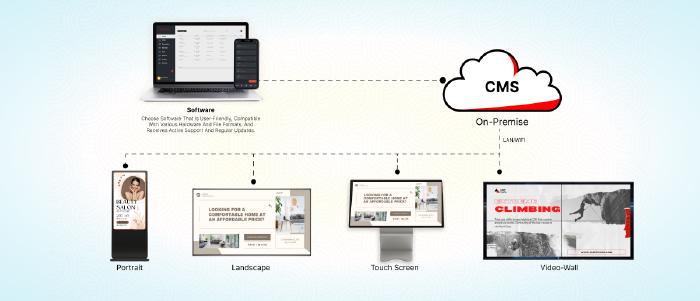
| Architecture model | Cloud, on-premise, or hybrid deployment. |
| Offline behavior | Local caching expectations and what continues to function without WAN. |
| Scalability limits | Elastic scale versus hardware-bound growth. |
| Long-term impact | Effect of architecture choices on security reviews and total cost of ownership (TCO). |
When these foundations are defined upfront, procurement decisions stay objective, defensible, and scalable. When they’re left vague, vendor selection gets driven by demos, assumptions, and short-term convenience, creating risk that surfaces only after rollout.
Your RFP should read like a set of requirements and proofs, not a feature wishlist. Keep sections distinct so responses are comparable.
| RFP section | What vendors must explicitly prove or commit to |
|---|---|
| Vendor viability & scale fit | • Financial stability or funding runway evidence. • Largest comparable live deployment (screen count, geographies, uptime context). • Reference customers in similar environments (retail, factories, healthcare, public sites). |
| Architecture execution | • Concrete explanation of how content is delivered and cached in practice. • Update and patch ownership, cadence, rollback method, and validation process. • Data portability guarantees: export of media, schedules, logs in standard formats. |
| Endpoint & fleet operations | • Remote actions supported: reboot, screenshots, health status, bulk operations. • Fleet consistency controls: baseline configuration, drift detection, golden image enforcement. • Hardware security capabilities where applicable. |
| Security & compliance | • Identity controls: SSO, RBAC depth, admin boundaries, audit logs. • Encryption standards: modern TLS, defined data flow boundaries. |
| Support, SLA & lifecycle | • Support tiers, escalation ownership, and availability model. • Firmware and OS lifecycle policy, including end-of-life handling. |
| Commercial structure & cost controls | • License model by screen, site, or feature. • Clear separation of included vs add-on items (integrations, monitoring, audit logs, premium support). |
Vendor evaluation should start by eliminating unacceptable risk.
Define disqualifiers before scoring: unverifiable security controls, unproven offline behavior, scale claims that do not match the target fleet and governance model, or support terms that lack clear resolution definitions.
Vendors that pass these gates can then be compared using weighted scoring aligned to enterprise priorities: security and compliance, operational reliability, commercial clarity over time, and technical fit.
Scoring should be based on observable behavior and contractual commitments, not feature descriptions.
Due diligence should cover update failures, outage handling, escalation paths, and recovery behavior based on reference checks at similar scale.
Proof of concept testing should include network loss, failed updates, power interruption, monitoring accuracy, and real user workflows. The digital signage player should demonstrate automatic recovery, precise alerting, enforced governance, rollback capability, and data portability before approval.
Who This Is For:
IT, security, and operations teams are responsible for procuring or standardizing enterprise digital signage and need predictable control over risk, scale, and long-term operations.

Pickcel aligns with the evaluation criteria above by focusing on predictable behavior at scale. It supports offline-first playback with local caching, role-based access and approval workflows, audit visibility, and remote fleet management across distributed deployments. Deployment options cover both cloud and on-premise environments, with clear ownership boundaries for security, updates, and operations.
If you want to validate these requirements against a live system or map them to your deployment constraints, you can connect with our team of experts with more then a decade of experience across industries globally.
Contact usHardware strategy in enterprise digital signage is about avoiding dependency. Hardware should not force a specific CMS, and CMS changes should not require replacing screens or players. Displays and players must remain usable across vendor changes and contract cycles.
Decoupling hardware from software: Avoid hardware that only works with a single CMS or requires vendor-specific firmware. Players should be re-imageable or repurposable across operating systems and CMS platforms. Hardware independence also simplifies security ownership.
Commercial displays vs consumer TVs: Consumer TVs fail under enterprise duty cycles. They are not designed for sustained brightness, static content, or 16/7–24/7 operation. Commercial displays are engineered for continuous operation, thermal stability, and serviceability.
Screen visibility must be specified by environmenT. Outdoor and window-facing displays also require high-TNI panels to prevent blackening under heat.
SoC vs external players: System-on-Chip displays (Tizen, webOS) reduce cabling and upfront cost and work well for large, uniform retail fleets. When performance needs change, the entire display must be replaced. External players separate compute from the screen.
For large or regulated deployments, hardware choices must align with how the system is designed end to end.
Read this blog on -> How to Design an On-Premise Digital Signage System for 10,000+ Screens.
The system must separate content creation from governance, device control, and operational risk so growth does not increase failure or manual effort.
Content governance: The CMS must enforce role separation, approvals, and template control. Central teams define structure and brand rules; local users operate within fixed boundaries. Governance must persist during offline playback, updates, and rollbacks.
Fleet operations: Device management must scale centrally. The CMS should provide remote visibility and control across the fleet: health status, screenshots, reboots, and bulk actions. Individual device handling does not scale.
Offline behavior: Content must cache locally and continue playing without WAN access. Updates should sync on reconnection without interrupting playback. Streaming-dependent systems introduce avoidable downtime and bandwidth cost.
Layouts and scheduling: Multi-zone layouts should be centrally locked and locally editable only where allowed. Independent zone scheduling must not allow hierarchy breaks or accidental content overrides.
Platform flexibility: The CMS must support mixed environments across SoC displays and external players. OS lifecycle support and patch validation must be predictable to avoid security and upgrade dead ends.
Automation and overrides: The CMS should support data-driven updates and conditional triggers to reduce manual effort. Emergency overrides must work instantly, including during network outages.
At scale, digital signage must be predictable on the network. Players should not compete with business-critical traffic or introduce unmanaged endpoints into core infrastructure.
| Item | Description |
|---|---|
| Network isolation | Signage devices must operate on segmented networks. VLAN or VRF isolation is mandatory to prevent lateral movement and contain failures or compromise. |
| Connectivity choice | Wired Ethernet is the default for stability. Wi-Fi is acceptable where cabling is impractical but must be treated as less reliable. Cellular is viable only with local caching; streaming over cellular is not operationally or financially sustainable. |
| Bandwidth control | Content delivery must be rate-limited and predictable. Store-and-forward architectures minimize network load and avoid playback dependency on live connectivity. |
| Latency expectations | Passive signage tolerates delay. Video walls require synchronization. Live or interactive use cases demand low-latency protocols. Latency requirements must be defined upfront and matched to the delivery method. |
| Network assumptions | IP addressing, firewall rules, DNS, and PoE power budgets must be documented before rollout. Undefined network constraints surface later as deployment blockers. |
Enterprise signage is part of the attack surface. Security controls must treat players as managed endpoints, not displays.
| Item | Description |
|---|---|
| Identity enforcement | User access must integrate with enterprise identity systems. Device access must rely on certificate-based authentication, not shared credentials. |
| Zero-trust posture | Players should initiate outbound connections only. Inbound ports, port forwarding, or direct access paths are unacceptable in enterprise environments. |
| Endpoint hardening | Devices must run in locked-down modes with unused services disabled. Physical and logical port access should be restricted to prevent local tampering. |
| Patch and lifecycle control | OS and firmware updates must be manageable at scale, with clear ownership and rollback paths. Unsupported operating systems create security dead ends. |
| Drift detection | Configuration baselines must be enforced. Unauthorized changes should be visible and correctable without site visits. |
Without governance, scale creates chaos. The system must enforce control by design, not policy documents.
| Item | Description |
|---|---|
| Role separation | Creation, approval, scheduling, and administration must be distinct roles. No single role should bypass governance by default. |
| Approval enforcement | Content should not reach screens without explicit approval where required. Emergency paths must exist without weakening standard controls. |
| Template control | Brand-critical elements must be locked. Local flexibility should exist only within predefined zones and rules. |
| Auditability | The system must record who changed what, when, and where it was deployed. Proof-of-play and configuration logs are required for accountability. |
| Multi-tenant isolation | Regional or departmental environments should be isolated to prevent cross-impact while remaining centrally governed. |
Enterprise deployments fail late when compliance is treated as an afterthought. These requirements must be baked into design decisions.
| Item | Description |
|---|---|
| Data privacy | Analytics and sensors must avoid collecting or transmitting raw personal data. Edge processing and configurable retention are required to meet privacy regulations. |
| Data residency | The system must support regional data hosting or on-premise operation where sovereignty laws apply. One global cloud region is rarely sufficient. |
| Accessibility | Hardware placement and content design must meet accessibility standards. Compliance applies to both physical reach and on-screen readability. |
| Energy control | Screens should not run by default. Power scheduling, brightness control, and low-energy display options reduce cost and support ESG goals. |
| Certification readiness | Security and compliance claims must be backed by certifications and artifacts. Gaps here delay or block deployment regardless of technical merit. |
At this stage, most decisions come down to operational confidence. Finance looks for predictable cost behavior across years, not optimistic ROI slides. IT looks for support clarity, upgrade ownership, and what happens when things fail at scale. Operations care about rollout discipline, remote control, and whether the system reduces manual work instead of creating it.
That’s where experience matters more than features.
Pickcel has been building and operating enterprise digital signage networks for over a decade, working with global brands across retail, corporate, manufacturing, healthcare, and public environments. The platform is shaped by real deployment constraints: controlled rollout, offline-first execution, structured governance, clear SLAs, and flexibility across cloud and on-premise digital signage software models.
If you’re at the stage of turning these requirements into an executable deployment.

An enterprise RFP should define scope, scale assumptions, deployment model, hardware and OS support, security controls, governance model, support SLAs, and commercial structure. Require evidence, not claims: live references at a similar scale, lifecycle policies, data portability, and a clear breakdown of total cost over 3–5 years.
Prioritize network segmentation, certificate-based device identity, SSO with role-based access, audit logs, encrypted communication, and locked-down endpoints. Vendors must prove patch ownership, incident response, and drift control. Signage players are managed endpoints and must meet the same baseline as other enterprise-connected systems.
Enterprise deployments rely on local caching and store-and-forward playback so screens continue running during WAN outages. Define exactly what functions offline: content playback, schedules, and emergency overrides. Internet should be required only for updates, monitoring sync, or external data feeds.
Dec 4 2025
11 min read
Dec 1 2025
9 min read

Oct 17 2025
10 min read
Dec 29 2025
14 min read
Take complete control of what you show on your digital signage & how you show it.
Start Free Trial Schedule My Demo