
Mar 6 2026

4 min read
March 05, 2026
4 min read


ALL
GENERAL
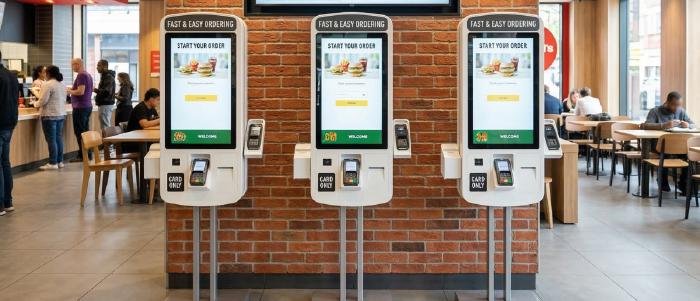
Kiosks are growing because they make ordering faster, easier to customize, and easier to upsell. But they do not replace signage in QSR.
Tillster found that 61% of kiosk users want more kiosks in restaurants, replacing the counter-ordering step. Customers still need to see the menu before they walk up, quickly check prices and availability, and know where to go after they place the order.
I really like this Instagram page, @happeas, because the owner actually shows how the restaurant runs and how customers use the kiosk in real life. People can clearly see what is available, which combinations they can choose from, and how easily they can customize their order. Multiple customers can browse and order at the same time; new customers can understand the process quickly, and the whole experience feels simple instead of confusing.

It helps the restaurant show, explain, and sell the menu in a way customers can understand on their own.
Browsing starts too late: When menu discovery begins at the kiosk, the screen becomes both the browsing surface and the transaction surface. Overhead digital menu boards and other supporting screens reduce that friction by letting customers review options from a distance and approach the kiosk with a clearer decision already in mind.
The store still has to guide people: Customers need to know where to order, where to wait, and where to pick up. Supporting screens do that work by helping guests decide earlier, wayfinding, and showing order status clearly, instead of leaving them to guess what happens next.
Trust drops when the experience feels unclear: If an item looks available but is sold out, if the pickup process is unclear, or if customers are unsure whether their order went through, confidence drops quickly. That is why kiosk-heavy setups need a wider screen system around them. Real-time menu updates and visible order-status communication matter because they set the right expectations before confusion starts.
If the message is for many customers at once, keep it on signage, and if the action is specific to one customer’s order, keep it on the kiosk. After payment, the signage should show the order status and pickup instructions. For covered chains, calories must also be shown on menus, menu boards, and next to self-service or display items.
| Keep on signage | Keep on the kiosk |
|---|---|
| Core menu visibility so customers can scan options before they walk up. | Full menu depth with modifiers, add-ons, and combo building. |
| Signature items, best-sellers, and limited-time offers. | Customization choices specific to one order. |
| Base prices and broad availability cues. | Cart-building, item-level upsells, and cross-sells. |
| Wayfinding, such as where to order, wait, and pick up. | Loyalty login, language selection, and accessibility controls. |
| Order status and pickup instructions after payment. | Payment and order confirmation for that specific basket. |
| Required menu-board disclosures where applicable. | Detailed order review before checkout. |
For most counter-service QSRs, the starting point is usually the same: digital menu boards, self-order kiosks, and order-status or pickup screens.
At this stage, digital menu board POS integration becomes important because it keeps pricing, availability, and menu updates aligned with the actual ordering system instead of relying on manual changes across screens.
Extra screens should be added only when the operation demands them:
Queue or promo screens when waiting become visible.
Back-of-house screens when modifier-heavy kiosk orders start putting pressure on prep speed and handoff.
Treat drive-thru as a separate screen flow, not an extension of the front counter. It usually needs a pre-sell board, a main menu board, and a confirmation screen to speed up decisions.
Also read: Why Digital Menu Board Costs Spiral and How to Budget Them Correctly
Kiosks are not taking away the need for signage screens in QSR. They make the need for a more connected screen setup more obvious.
If pricing, availability, offers, or calorie information do not match across menu boards, kiosks, and other ordering surfaces, the customer sees the inconsistency immediately.
The real requirement is one system that keeps them aligned across locations. A central CMS tied to POS data helps keep menu changes, prices, and availability consistent across screens instead of updating them manually.
Pickcel gives QSR teams one central CMS to manage digital menu boards, kiosks, promo screens, and pickup displays from one place. It supports digital menu board POS integration, remote kiosk management, content scheduling, multi-location updates, offline playback, and hardware flexibility across touch screens, tablets, kiosks, and displays. That makes it easier to keep the menu accurate, the ordering flow clear, and the customer experience consistent, even when the internet drops or the setup spans multiple locations.

Mar 6 2026
4 min read
Mar 6 2026
6 min read
Jan 2 2026
10 min read
Dec 24 2025
10 min read
Take complete control of what you show on your digital signage & how you show it.
Start Free Trial Schedule My Demo