

Dec 19 2025

11 min read
December 01, 2025
9 min read


ALL
ENTERPRISE

Once you scale your signage from 2/3 to multiple screens across offices, floors, regions, or campuses, the real challenge isn’t publishing content anymore. It’s controlling who publishes what and keeping every message accurate, compliant, and on-brand.
Multiple departments want publishing access.
Local teams push what they think is relevant.
The corporation tries to maintain consistency.
IT owns access and security, but doesn’t want to approve slides.
And somewhere in the middle, content starts getting uploaded without oversight, reused past its expiry, or scheduled on the wrong screens.
A governance policy provides the framework for who creates, reviews, approves, and publishes content.
It sets the rules for ownership, approval, accountability, and access. It defines what’s allowed, what requires review, and who has authority over which screens, regardless of the digital signage software solution you use.
A governance policy provides the framework for who creates, reviews, approves, and publishes content.
Without a clear policy, small issues stack up, outdated messages stay live, approvals get bypassed, content goes out on the wrong screens, and no one has a clean record of who published what.
With it, the network stays consistent, predictable, and scalable across every location. The next section breaks down how to create a content governance policy for enterprise digital signage.
Who This Is For:
Digital workplace managers, IT/AV teams, internal communications leads, and regional operations managers who need a clear, practical way to bring structure, consistency, and accountability to multi-location digital signage without slowing teams down.
The governance framework sets the planning rules, reviewing, approving, and publishing content across locations.
| Focus Area | How It Works in Practice |
|---|---|
| What the Network Is Trying to Achieve | Align on the core objectives for enterprise signage: consistent messaging across locations, preventing outdated content, maintaining brand/compliance standards, supporting local teams with guardrails, and reducing manual work as the network scales. |
| Audience & Location Mapping | Identify who each screen is for and set update frequency accordingly: high-traffic, operational/plant, department zones, or public-facing screens. This keeps digital signage content relevant and structured. |
| Core vs Local Content Boundaries | Define the two content streams clearly. Core Content: corporate-owned, brand-critical, compliance-sensitive, organization-wide updates. Local Content: site-specific updates, events, schedules, operational info, and real-time local data. Specify ownership, approval paths, distribution rules, and which playlists cannot be modified locally. |
| System Structure for Scale (Multi-Tenant Model) | Use a multi-tenant structure to manage growth cleanly, one master tenant for corporate, location/department tenants for local use. Shared playlists auto-update, corporate content stays locked, and local content is managed independently. Ideal for on-premises digital signage software deployments. |
| Content Standards & Requirements | Set basic rules: tone, templates, visual/accessibility requirements, and media formatting for images, videos, and data-driven content. |
| Acceptable, Restricted & Prohibited Content | Document three levels: • Acceptable (approved by default). • Restricted (requires legal/compliance/leadership review). • Prohibited (never allowed under any conditions). |
Start by assigning roles to prevent overlap and remove ambiguity. Keep permissions tight; each role should only have the access needed for its tasks.
Every recurring task, content creation, approval, scheduling, expiry checks, and playlist updates must have one clearly accountable owner.
Administrator/IT Owner: Owns system access, security, and technical integrity. Manages user provisioning, permissions, and audit visibility. Does not create or approve content.
Content Manager/Scheduler: Owns what gets published, where it goes, and when. Manages playlists, templates, and timing across locations. Ensures updates follow the governance rules.
Approver (Comms/Brand/HR/Compliance): Owns the final sign-off. Ensures content meets brand, accuracy, and compliance requirements before it reaches screens.
Creator / Contributor: Owns creates location-specific content within the boundaries set by governance. Submits drafts for review and cannot publish without approval.
Device / Screen Operator: Owns hardware health, handles reboots, player issues, and physical maintenance without touching content workflows.
Once the governance framework and roles are defined, the next step is translating them into the CMS so the system enforces the rules automatically.
| Action | How It Works Inside the CMS |
|---|---|
| Map roles into the system | Use the CMS to apply the role boundaries you’ve already defined. |
| Set up a structure for multi-location publishing | Mirror the organization’s footprint inside the CMS. Use one corporate environment and separate environments for locations or departments. |
| Lock templates and core assets | Keep brand templates, standardized layouts, and core playlists locked at the corporate level. Storing everything in a centralized library reduces errors and strengthens digital signage security. |
| Enforce approvals inside the workflow | Use the CMS to route drafts through a simple approval path instead of external channels. Maintain a fast-track route for urgent operational or safety messages. |
| Track actions automatically | Enable audit logs so the system records who changed what and when. Version history should allow quick rollbacks when mistakes slip through. |
| Automate freshness where possible | Set expiry rules, scheduled take downs, and connect screens to live data sources so content stays current without manual updates. Dashboards, calendars, KPIs, and safety info should update themselves once integrated. |
Pickcel builds these governance needs directly into the platform, making it easier for IT, corporate comms, and local teams to operate within clearly defined boundaries.
RBAC with granular permissions so each user gets exactly the access required.
SSO and MFA to secure user identity and prevent unauthorized access.
Audit logs capture every publish, edit, or permission change for traceability and compliance.
Approval workflows are implemented through controlled roles and custom setups.
Screen grouping and tagging to route content only to the right screens and avoid distribution mistakes.
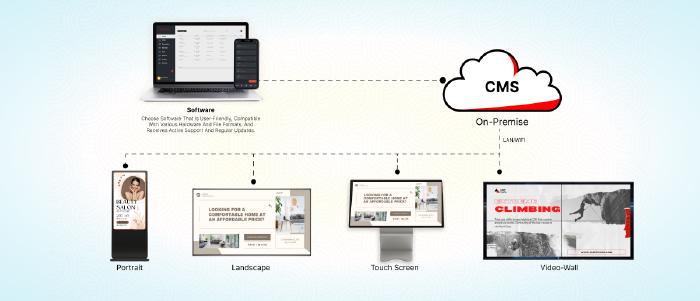
On-premise hosting is an option for organizations that require tighter control over data and governance.
SOC 2 and ISO 27001 certification to align with enterprise-grade security and operational standards.
Before you scale the system, you need clear guardrails for accuracy, compliance, and risk.
| Focus Area | How It Works in Practice |
|---|---|
| Content Rights & IP Compliance | • Confirm rights for every asset before uploading. • Keep a simple record of licensed images, agency creatives, and third-party content. • Block anything that doesn’t have clear usage rights. |
| Regulatory Compliance | Apply mandatory checks only where needed: disclosures for finance, PHI restrictions for healthcare, and student-data constraints for education. |
| Privacy & Data Exposure Controls | • Prevent dashboards from exposing emails, IDs, grades, or internal metrics. • Mask sensitive fields or use filtered views. Add clear notices if analytics sensors/cameras are used. |
| Region-Specific Governance | • Adapt content to regional laws and languages. • Maintain a small set of rules per region. • Use location-based targeting to enforce them. |
| Risk Escalation Rules | Define a short list of “high-risk” content categories that require extra review: legal statements, financial data, medical info, crisis communication, third-party promotions. Everything else follows the normal workflow. |
Once the governance model is live, the priority is keeping it effective as teams change, locations grow, and content volume increases.
Keep governance current: Run quick content, template, and screen audits to ensure everything still fits the audience and brand.
Review user access as teams change: Remove old accounts, update permissions when roles shift, and fix any approval-stage delays.
Track only the KPIs you can act on: Monitor freshness, compliance, approval time, and basic engagement signals to guide improvements.
Keep training short and targeted: Onboard new creators fast, give short refreshers when rules change, and share simple brand/compliance checklists.
Prevent shadow publishing: Keep one clear publishing path, make rules easy to find, and let the CMS enforce who can actually publish.
Support multi-region or global needs: Centralize core messaging, allow guarded local updates, route language variants correctly, and note region-specific requirements.
Update the governance model as you grow: Adjust for new formats, new markets, team shifts, and changing legal or operational requirements.
A strong governance framework reduces operational risk, shortens approvals, and gives every team a predictable way to manage content as the network grows.
The organizations that get this right treat governance as an ongoing system, not a one-time project.
If you’re running a multi-location or multi-region signage network, the easiest way to get there is to work with a platform that already understands these challenges.
Pickcel supports 9000+ businesses, including Amazon, Mercedes, Decathlon, and PepsiCo, helping them run enterprise signage with firm control, reliable governance, and the right balance of corporate oversight and local flexibility.
Our team has spent over a decade solving these exact problems for IT, corporate communications, and large operational networks. If you want help tightening your governance model or structuring it for scale.

A content governance policy is the rulebook that defines how content is created, reviewed, approved, published, and maintained across all screens. It sets roles, workflows, standards, and guardrails so every message stays accurate, consistent, compliant, and aligned with business objectives.
Large networks have many teams publishing content. Governance prevents inconsistency, off-brand messaging, compliance issues, and outdated content from going live. It establishes ownership, approval clarity, and security controls so multi-location signage stays reliable, predictable, and low-risk as the network scales.
Approvals ensure every item is reviewed for accuracy, quality, and compliance before going live. Role-based access limits what each user can create, edit, or publish. Together, they prevent unauthorized changes, reduce errors, and make the entire workflow accountable and secure.
Use a dual-layer structure: corporate controls core messaging, templates, and brand assets; local teams get limited permissions to publish site-specific content within defined guardrails. A multi-tenant CMS, locked templates, and labeled content routes keep both consistency and local relevance intact.


Dec 19 2025
11 min read
Dec 4 2025
11 min read

Oct 17 2025
10 min read

Dec 29 2025
14 min read
Take complete control of what you show on your digital signage & how you show it.
Start Free Trial Schedule My Demo